
Download videos.
Share in Discord.
Save and share videos and images from your favorite social platforms.
Free forever. Trusted by 10,000+ users.
Video, creator, context.
The video, its creator, and the post details, together in your channel.
- Videos you can save and share
- Download videos without watermarks or save slideshow images, including TikTok slideshows. Watch them in chat or keep the files.
- The details come with it
- See the creator, caption, track link, views, likes, comments, shares, and original post date in a readable Discord embed.
- Free forever
- Open-source, with no subscriptions, paywalls, fees, or trials. Simple, fast, and reliable.
See a download in Discord.
Send a link. Get the video, its creator, and a download.
See all three download methods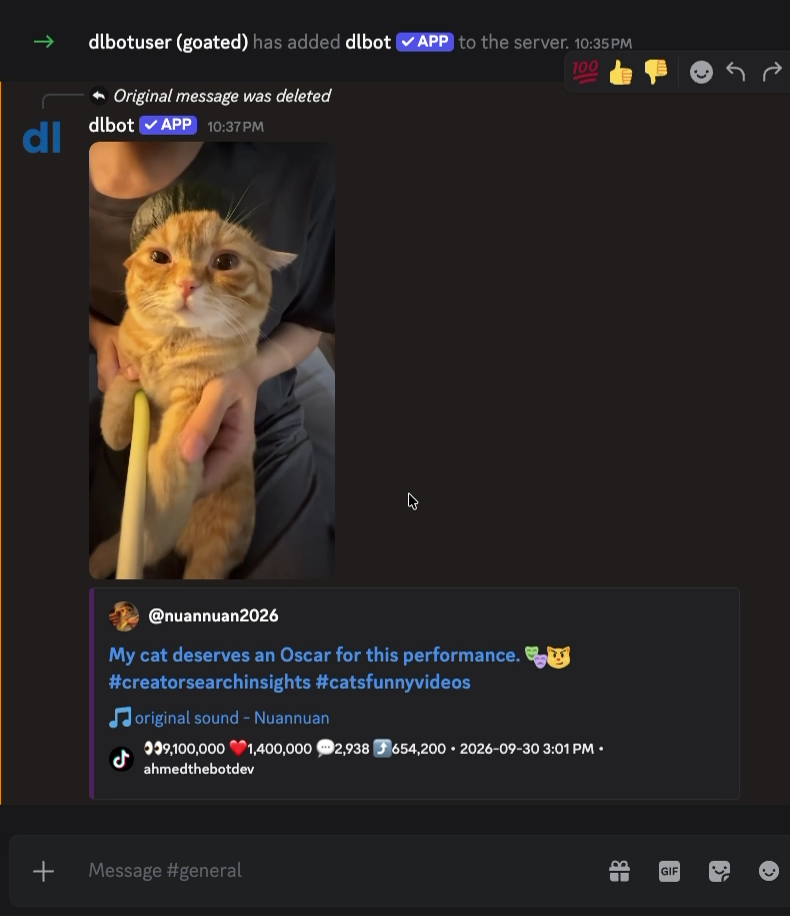
Three ways to download.
Send a link with a mention, use a slash command, or download a link already in chat.
- Mention dlbot
- Send
@dlbotand your link together in the same message. @dlbot <link>- Use a slash command
- Type
/dlor/download, then paste your link into the URL field. /dl <link>/download <link>- Use a message’s link
- Right-click the message on desktop or long-press it on mobile. Open Apps and choose Download.
- Apps → Download
See example links
@dlbot https://www.tiktok.com/@user/video/123456789
/download https://www.instagram.com/p/ABC123/
/dl https://x.com/user/status/123456789
/download https://www.youtube.com/watch?v=VIDEO_ID
/dl https://www.facebook.com/watch/?v=123456789
About legacy text commands
Plain text commands without a mention are no longer supported. Use a slash command, include your link in the same message as @dlbot, or choose Apps → Download on an existing message instead.
dl {url}download {url}
Put dlbot in the chat.
Clean embeds. Fast downloads. Zero headaches.